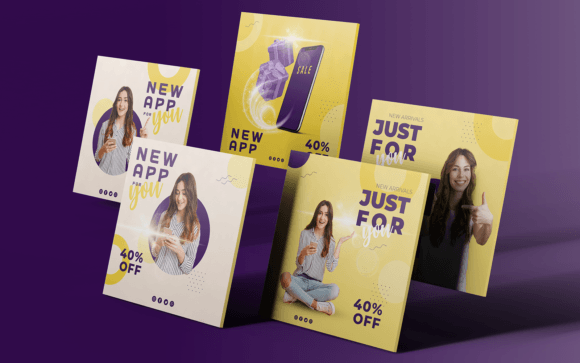
Mastering Visual Consistency with Social Media Templates
In the fast-paced world of digital marketing, maintaining a consistent visual identity is no longer a luxury—it’s a necessity. For designers, entrepreneurs, and content creators, the challenge often lies in producing high-quality graphics quickly without sacrificing brand integrity. This is where a well-structured set of Social Media Templates becomes an indispensable asset. These aren't just pre-made designs; they are strategic tools engineered for efficiency and impact.
The Anatomy of an Effective Template
Let’s dissect what makes a template set truly functional. A high-quality Social Media Template is defined by its adaptability and technical precision. The file format matters significantly. An Adobe EPS file, for instance, is a powerhouse for designers because it preserves vector data, meaning you can scale the design to any size without losing clarity. This is crucial for creating assets that might be used across a tiny Instagram story or a large desktop banner.
Color mode is another critical specification. Templates designed in RGB are optimized for digital screens, ensuring the colors you see on your monitor translate accurately to social feeds. This attention to technical detail saves hours of guesswork during the production phase.
Furthermore, the user experience within the design file is paramount. A truly customizable template utilizes the Text Tool exclusively for all copy. This seems like a small detail, but it is the difference between a frustrating editing session and a seamless one. When text is editable via standard tools, it allows for rapid changes in messaging, font swaps, and resizing without breaking the layout's grid.
Strategic Applications for Modern Brands
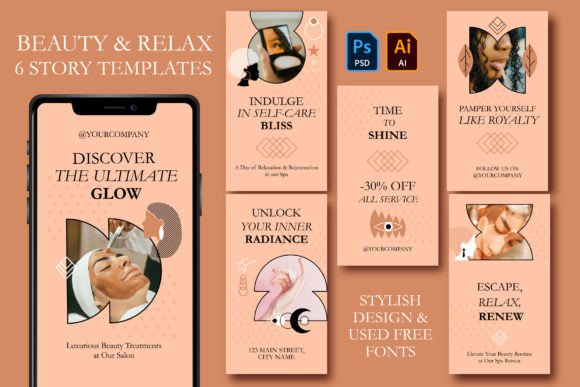
The versatility of these design assets extends far beyond simple Instagram posts. For the small business owner, these templates act as a bridge to professional-looking content. You can maintain a cohesive brand identity across Facebook, LinkedIn, and Pinterest without needing to commission a new design for every single update.
Consider the workflow of a blogger or publisher. Editorial calendars are tight, and the demand for fresh content is relentless. By utilizing a standardized set of social media graphics, a publisher can ensure that their visual language remains recognizable to their audience. This consistency builds trust; when a follower sees a familiar color palette or layout structure in their feed, they are more likely to stop and engage.
For agencies and freelancers, these templates serve as a foundation for client work. Instead of starting from a blank canvas, a designer can import a client’s brand assets—logos, specific color hex codes, and typography—into the template structure. This streamlines the approval process and allows for rapid prototyping of social campaigns.
Typography and Visual Hierarchy in Templates
One of the most overlooked aspects of template design is the pre-set typography. Good templates often utilize a modern typeface combination that establishes a clear visual hierarchy. You will typically see a pairing of a bold display font for headlines and a clean sans serif font for body copy. This contrast is not just aesthetic; it guides the viewer's eye from the most important information (the hook) to the supporting details.
While the templates may come with free font recommendations, the true power lies in their ability to be swapped out. A fashion brand might swap the default sans serif for a sophisticated serif font to evoke elegance. A craft business might introduce a script font or handwritten font to add a personal, artisanal touch. The structure of the template supports these choices, ensuring that regardless of the font personality, the text remains legible and well-positioned.
Readability is the cornerstone of engagement. If your audience has to squint to read the text on a mobile device, the message is lost. High-quality templates are built on grids that respect safe zones and margins, ensuring that text remains accessible even on varying screen sizes.
Practical Guidance for Implementation
When integrating these assets into your workflow, approach them with a strategic mindset rather than a decorative one. Here are practical ways to maximize their value:
- Evaluate Project Fit: Before purchasing or downloading, look at the layout structure. Does it leave enough "negative space" for your imagery? If your brand photography is busy and detailed, you need templates with clean, solid background areas to prevent visual clutter.
- Testing Font Pairings: Don't just accept the default fonts. Open the file and experiment with your brand’s primary and secondary typefaces. Check the letter-spacing and line-height after swapping fonts. Sometimes a new font requires slight adjustments to the text box to maintain readability.
- Photo Integration: Note that templates often do not include photos. This is actually a benefit, as it forces you to use your own unique imagery. High-quality, original photography paired with a professional template design creates a bespoke look that stock imagery cannot replicate.
- Consistency is Key: Select 3-4 templates from a larger set that you will use consistently for three months. This repetition helps train your audience to recognize your content format, increasing brand recognition.
Elevating Your Digital Presence
Ultimately, Social Media Templates are about removing friction from the creative process. They provide the structure so that you can focus on the strategy and the message. Whether you are launching a new product, sharing a client testimonial, or promoting a blog post, having a reliable set of design assets ensures that your visual communication remains sharp, professional, and effective.
By leveraging files that are optimized for digital display (RGB), scalable (EPS), and user-friendly (editable text), you empower yourself to produce content that not only looks good but performs well. In the crowded digital landscape, that combination of aesthetics and function is what sets a brand apart.